


Buying a laptop for work sounds simple until you actually start comparing options — then you’re staring at a dozen near-identical spec sheets trying to figure out whether an extra $400 for OLED and more RAM is actually worth it for what you do all day. The honest answer: it depends heavily on whether your job is mostly email and spreadsheets, heavy multitasking across dozens of browser tabs, or occasional creative and data work layered on top of the basics.
- Direct Answer: The Best Laptops for Work at a Glance
- Apple MacBook Air (M4) — Best Overall for Most Professionals
- Lenovo ThinkPad X1 Carbon Gen 14 — Best Windows Business Laptop
- Dell 14 Premium — Best for Power Users and Multitasking
- Dell Pro 14 Premium — Best Lightweight Ultraportable for Travel
- Acer Aspire 5 — Best Budget Pick
- Comparison Table
- How to Choose the Right Work Laptop
- FAQ’s
- Conclusion
This guide narrows the 2026 market down to five laptops that consistently perform well for real work — not gaming benchmarks — covering a range of budgets and operating systems, with actual current pricing and where each one falls short.
Direct Answer: The Best Laptops for Work at a Glance
- Best overall for most professionals: Apple MacBook Air (M4)
- Best Windows business laptop: Lenovo ThinkPad X1 Carbon Gen 14
- Best for power users and multitasking: Dell 14 Premium
- Best lightweight ultraportable for travel: Dell Pro 14 Premium
- Best budget pick: Acer Aspire 5
Below, we break down what each laptop is actually good at, current pricing, and who should skip it.
Apple MacBook Air (M4) — Best Overall for Most Professionals
The MacBook Air has been a go-to work laptop recommendation for years, and the M4 model continues that streak with strong day-to-day performance, a fanless silent design, and battery life that comfortably covers a full workday without hunting for an outlet.
Key specs:
- Apple M4 chip (8 or 10-core GPU depending on configuration)
- 16GB unified memory standard, configurable up to 32GB
- 13-inch or 15-inch Liquid Retina display options
- No fan — completely silent under normal work loads
Pricing: With the M5 MacBook Air now available, the M4 has moved into clearance pricing, generally landing around $999–$1,099 for base configurations — roughly $100–$200 less than the equivalent M5 model. If you don’t need the M5’s doubled base storage or Wi-Fi 7, the M4 is a strong value at this price.
Pros:
- Excellent battery life and completely silent, fanless operation
- Fast, responsive performance for everyday multitasking, video calls, and office work
Cons:
- RAM is fixed at purchase with no upgrade path — 16GB is fine for most, but plan ahead if you expect heavier workloads later
- Requires macOS compatibility for any Windows-specific business software; virtualization or alternatives may be needed
Lenovo ThinkPad X1 Carbon Gen 14 — Best Windows Business Laptop
For professionals who need Windows and want the closest thing to a gold-standard business laptop, the ThinkPad X1 Carbon Gen 14 delivers an ultralight build, a redesigned internal “Space Frame” architecture for better cooling and repairability, and the keyboard ThinkPad has built its reputation on.
Key specs:
- Intel Core Ultra X7 Series 3 processors
- Up to 64GB LPDDR5x RAM
- 2.8K OLED display option (base model ships with WUXGA IPS)
- Three Thunderbolt 4 ports; weighs roughly 996 grams
Pricing: The Aura Edition starts at $1,999 for the base configuration. Upgrading to the OLED display, 64GB RAM, and larger storage pushes the price well above $2,500. Corporate buyers can often access volume discounts through Lenovo’s business portal.
Pros:
- Legendary keyboard feel that remains hard to match on any competing laptop
- Scored 9/10 on iFixit for repairability — genuinely rare for an ultraportable business laptop
Cons:
- Base configuration’s IPS display and lower-tier processor are noticeably behind what the OLED/high-RAM configuration offers — budget for the upgrade if display quality matters to your work
- Starting price is a meaningful jump over mainstream consumer laptops in the same size class
Dell 14 Premium — Best for Power Users and Multitasking
The Dell 14 Premium is effectively the successor to Dell’s long-running XPS line under a new name, and it leans into performance over pure portability — a good fit for professionals who regularly multitask across heavy applications rather than prioritizing the lightest possible build.
Key specs:
- Intel Core processor options with optional discrete Nvidia RTX 4050 graphics
- Base display: 2560×1440 IPS-LCD; upgradeable to a 3200×2000 120Hz OLED panel
- Haptic touchpad, roughly 5.5 inches wide
- Available in graphite and platinum finishes
Pricing: The base configuration starts at $1,649.99 MSRP (16GB RAM, 512GB storage, non-touch IPS display), though Dell frequently runs sales — configurations with the OLED display upgrade have been seen around $1,899.99 on discount.
Pros:
- Strong multitasking and multimedia performance, including faster 4K-to-1080p video transcoding than several competitors in its class
- Optional discrete graphics add real flexibility for occasional creative or light gaming use
Cons:
- Noticeably heavier and thicker than typical ultraportables — Dell prioritized performance over slimness here
- You likely won’t pay the MSRP; pricing structure makes it harder to budget without checking current sales
Dell Pro 14 Premium — Best Lightweight Ultraportable for Travel
If your work involves frequent travel and portability matters more than raw power, the Dell Pro 14 Premium is built specifically around that priority — light enough to carry all day without becoming a burden, while still covering standard productivity workloads comfortably.
Key specs:
- Intel Core Ultra 5 processor options (vPro available)
- 16GB LPDDR5x memory
- Weighs approximately 1.15 kg (2.54 lbs) — notably lighter than the 1.42 kg average for laptops in its size class
- 2 Thunderbolt 4 ports with DisplayPort and Power Delivery
Pricing: Pricing varies by configuration; base Dell Pro 14 Premium models with Core Ultra 5 processors and integrated graphics are generally positioned in the $1,200–$1,600 range depending on current promotions — check Dell’s site for the specific configuration and active discounts.
Pros:
- Genuinely light for its size class, making it a strong choice for frequent flyers and hybrid workers
- Solid screen-to-body ratio and thin bezels make good use of the compact chassis
Cons:
- Prioritizes portability over raw power — not the right pick if your work involves heavy multitasking or graphics-intensive applications
- Integrated graphics only on base configurations; no discrete GPU option
Acer Aspire 5 — Best Budget Pick
Not every job needs a premium business laptop, and the Acer Aspire 5 has become a consistent budget recommendation for a reason: solid everyday performance, a comfortable keyboard, and a reasonable port selection, all comfortably under $700.
Key specs:
- Intel Core i5 (some configurations offer i7) processor
- 16GB of RAM
- 512GB SSD
- 15.6-inch Full HD IPS display
Pricing: Generally available for under $700, with some configurations dipping closer to $500–$600 depending on sales and retailer.
Pros:
- Snappy day-to-day performance for browsing, office work, and video calls, with fast boot times
- Comfortable keyboard and better-than-expected port selection (USB-C and HDMI included) for the price point
Cons:
- Display isn’t color-accurate enough for professional design or photo work, though it’s fine for general productivity and streaming
- Build quality and long-term durability, while solid, don’t match business-line laptops like the ThinkPad or Dell Pro series
Comparison Table
| Laptop | Best For | Starting Price | Weight |
|---|---|---|---|
| MacBook Air (M4) | Overall value and battery life | ~$999–$1,099 | ~2.7 lbs (13″) |
| ThinkPad X1 Carbon Gen 14 | Windows business use | ~$1,999 | ~2.2 lbs (996g) |
| Dell 14 Premium | Power users/multitasking | ~$1,649.99 MSRP | Heavier, performance-first build |
| Dell Pro 14 Premium | Lightweight business travel | ~$1,200–$1,600 | ~2.54 lbs (1.15kg) |
| Acer Aspire 5 | Budget productivity | Under $700 | Standard 15.6″ weight |
How to Choose the Right Work Laptop
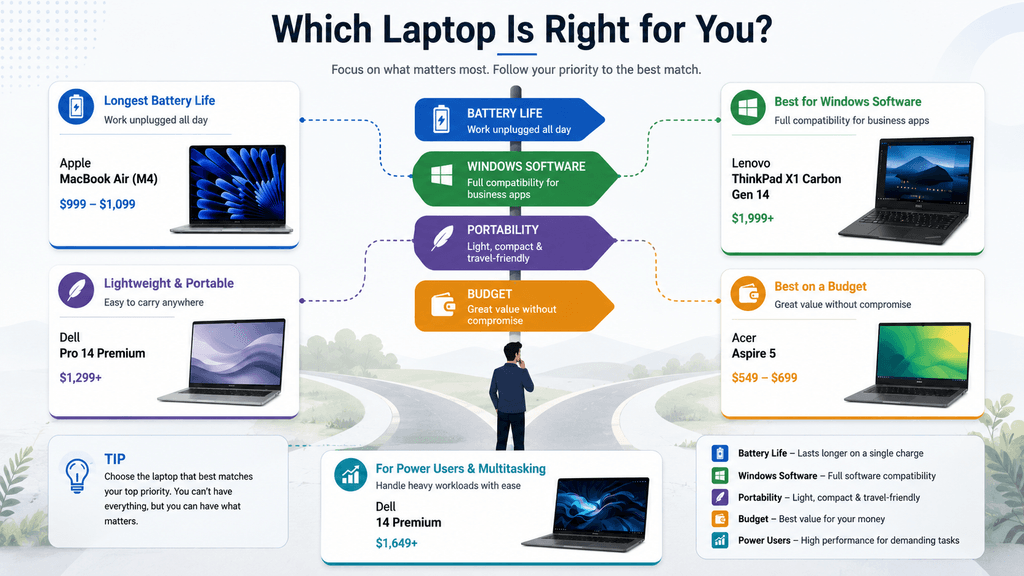
Before comparing spec sheets line by line, get clear on what actually matters for your day-to-day work:
- Operating system requirements. If your company or industry relies on Windows-specific software, that rules out macOS options like the MacBook Air regardless of how good its battery life is. Confirm compatibility first.
- How much you travel. If you’re carrying your laptop daily, weight and battery life (Dell Pro 14 Premium, MacBook Air) should outweigh raw performance specs. If it mostly stays on a desk, that trade-off matters less.
- Keyboard feel, tested in person if possible. You’ll interact with the keyboard more than any other component. Responsive, non-mushy keys matter more over years of daily use than most spec-sheet numbers.
- Display needs. A standard 1920×1080 panel is a fine minimum for general productivity; upgrade to OLED or higher resolution specifically if your work involves visual detail (design, data visualization, extensive document review).
- Upgradability, or the lack of it. Increasingly, productivity laptops — including most on this list — ship with soldered memory and storage. Buy the RAM configuration you’ll need in year three or four, not just what covers today’s workload, since you likely can’t upgrade later.
FAQ’s
Is a MacBook or a Windows laptop better for work?
It depends entirely on your software requirements, not general quality. macOS laptops like the MacBook Air offer excellent battery life and performance for general productivity, but Windows remains necessary for many business-specific applications — check compatibility before choosing based on other factors.
How much RAM do I actually need for work in 2026?
16GB is a comfortable baseline for most productivity work — office applications, browser-heavy multitasking, video calls. Consider 24–32GB if you expect to keep the laptop for four-plus years or regularly run heavier workloads like large spreadsheets, virtualization, or video editing.
Is it worth paying extra for an OLED display on a work laptop?
Mainly if your work involves visual detail — design review, data visualization, extensive photo or video work. For general office productivity (email, documents, spreadsheets, video calls), a good IPS display is genuinely sufficient and saves meaningful money.
What’s the most important spec for a laptop that travels frequently?
Weight and battery life matter far more than raw processing power for a laptop that’s carried daily. The Dell Pro 14 Premium and MacBook Air both prioritize this; heavier performance-first laptops like the Dell 14 Premium are better suited to laptops that mostly stay in one place.
Conclusion
There’s no single best laptop for work — there’s the best laptop for how you specifically work. The MacBook Air M4 remains the strongest all-around value for most professionals who don’t need Windows-specific software. The ThinkPad X1 Carbon Gen 14 is the pick for Windows users who want a business-grade build and keyboard. The Dell 14 Premium suits power users who multitask heavily and don’t mind extra weight. The Dell Pro 14 Premium is built for frequent travelers who prioritize portability. And the Acer Aspire 5 proves you don’t need to spend over a thousand dollars to get a genuinely capable productivity laptop.
Pricing, specifications, and availability for laptops change frequently and may have been updated since this article was published. Always verify current pricing and specs directly on the manufacturer’s or retailer’s official website before purchasing. This article is for informational purposes and does not constitute professional purchasing advice.