


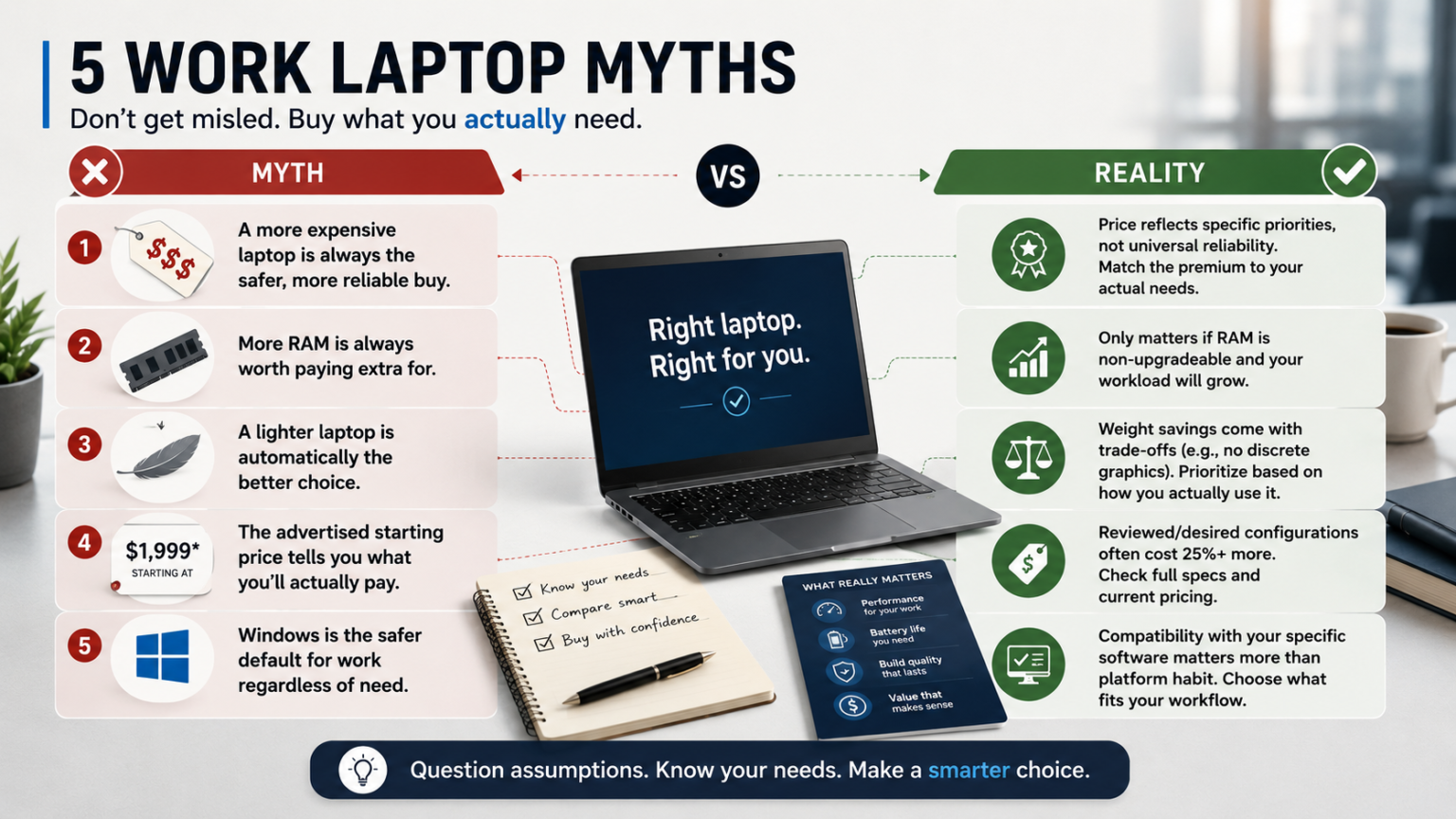
Ask ten people what makes a “good” work laptop, and a lot of the answers trace back to assumptions nobody’s actually tested — more expensive means more reliable, more RAM is always worth paying for, a lighter laptop is automatically the better choice. Some of this advice held up better a couple of years ago. In 2026’s laptop market, several of these assumptions are quietly steering buyers toward overspending or picking a machine that doesn’t actually fit how they work.
- Myth 1: “A more expensive laptop is always the safer, more reliable buy”
- Myth 2: “More RAM is always worth paying extra for”
- Myth 3: “A lighter laptop is automatically the better choice for work”
- Myth 4: “The advertised starting price tells you what you’ll actually pay”
- Myth 5: “Windows is the safer default for work regardless of your specific software needs”
- Myth vs. Reality: Quick Reference
- FAQ’s
- Conclusion
Here are five of the most common myths about work laptops, what the evidence actually shows, and what to do instead.
Myth 1: “A more expensive laptop is always the safer, more reliable buy”
The assumption: Since the Lenovo ThinkPad X1 Carbon Gen 14 and Dell 14 Premium cost significantly more than the Acer Aspire 5, they must be the more reliable, longer-lasting choice for anyone who can afford them.
The reality: Price often reflects a specific design priority — premium materials, repairability, discrete graphics — not a universal reliability upgrade for every use case. The Acer Aspire 5 delivers genuinely strong day-to-day performance for standard productivity work at under $700; its gap with business-line laptops shows up specifically in long-term build durability and display color accuracy, not in whether it reliably handles email, browsing, and office applications. For a buyer whose workload never touches those specific gaps, the expensive laptop isn’t “more reliable” — it’s just more expensive.
What to do instead: Match the premium to a specific need you actually have (repairability for frequent travel, discrete graphics for creative work, display accuracy for design), not to a general sense that spending more is inherently safer.
Myth 2: “More RAM is always worth paying extra for”
The assumption: Since RAM is one of the most commonly cited laptop specs, upgrading to the maximum available configuration is a smart, low-risk way to future-proof any purchase.
The reality: It depends entirely on whether the laptop’s RAM is upgradeable later. On laptops with no upgrade path — including the MacBook Air, which ships with RAM fixed at purchase and maxes out at 32GB — the case for paying extra upfront is genuinely strong, since 16GB may be limiting for demanding workloads three or four years out. But on laptops where you’re already well above your actual workload’s needs, paying for the maximum tier simply because it’s available isn’t future-proofing — it’s paying for headroom you may never use.
What to do instead: Check whether the specific laptop’s RAM is soldered or upgradeable, then decide based on your expected workload years out, not on the general principle that more RAM is always the safer purchase.
Myth 3: “A lighter laptop is automatically the better choice for work”
The assumption: Since ultraportable laptops like the Dell Pro 14 Premium (1.15 kg) and ThinkPad X1 Carbon Gen 14 (996 grams) get consistent praise for their weight, lighter is simply the smarter default choice for any work laptop purchase.
The reality: Weight savings on these laptops come from real design trade-offs — the Dell Pro 14 Premium, for instance, ships with integrated graphics only, no discrete GPU option at any base configuration. For a laptop that mostly stays on a desk, this trade-off buys nothing: you’re paying a portability premium and accepting a graphics limitation for a benefit (easier carrying) you rarely use.
What to do instead: Weight should be prioritized specifically in proportion to how often you actually carry the laptop daily. A desk-bound laptop gains nothing from being built around portability, while a frequently-traveling one gains a lot.
Myth 4: “The advertised starting price tells you what you’ll actually pay”
The assumption: A laptop advertised as “starting at $1,649.99” (like the Dell 14 Premium) or “$1,999” (like the ThinkPad X1 Carbon Gen 14) gives a reliable sense of what you’ll spend to get a laptop worth reviewing.
The reality: In both cases, reviewers note the base configuration is meaningfully different from what’s typically tested and praised. The Dell 14 Premium’s MSRP configuration lacks the OLED upgrade most reviews describe, while frequent sales mean actual paid prices fluctuate independently of MSRP. The ThinkPad’s $1,999 starting price gets a lower-tier IPS display and processor, with the OLED and higher-RAM configuration most reviews praise pushing the price above $2,500 — a jump of well over 25%.
What to do instead: Treat advertised starting prices as an entry point to a lineup, not a reliable estimate of what you’ll pay for the specific configuration you actually want. Check the full configuration and current pricing before budgeting.
Myth 5: “Windows is the safer default for work regardless of your specific software needs”
The assumption: Since many workplaces default to Windows laptops, choosing Windows is the lower-risk option even without checking whether your specific work actually requires it.
The reality: For general productivity — email, documents, browsing, video calls — macOS options like the MacBook Air handle the workload just as well, often with better battery life and a quieter, fanless design. The real risk isn’t the operating system itself; it’s compatibility with specific business software your role might require. Defaulting to Windows “to be safe” without checking actual software requirements can mean missing out on meaningfully better battery life and performance-per-dollar for no real functional gain.
What to do instead: Check compatibility for the specific software your job requires before defaulting to either platform. If nothing you use is Windows-locked, the “safer” choice might actually be whichever platform better fits your daily workflow, not whichever one is more common in office settings.
Myth vs. Reality: Quick Reference
| Myth | Reality |
|---|---|
| More expensive laptops are always more reliable | Price reflects specific design priorities, not universal reliability |
| More RAM is always worth paying for | Only matters if RAM is non-upgradeable and your workload will grow |
| Lighter laptops are automatically the better choice | Weight savings come with real trade-offs (e.g., no discrete graphics) |
| Advertised starting price reflects what you’ll pay | Reviewed/desired configurations often cost 25%+ more than the headline price |
| Windows is the safer default regardless of need | Compatibility with your specific software matters more than platform habit |
FAQ’s
If price doesn’t guarantee reliability, how do I actually judge build quality?
Look for specific signals: repairability scores (like the ThinkPad’s 9/10 iFixit rating), materials described in reviews (aluminum/magnesium chassis versus plastic), and whether the laptop is part of a manufacturer’s business line versus consumer line — these are more reliable indicators than price alone.
How do I find out if a laptop’s RAM is soldered or upgradeable before buying?
Check the manufacturer’s official specification page or a detailed teardown review — this information isn’t always prominent on marketing pages, but it’s typically disclosed in full spec sheets or product support documentation.
Is there ever a good reason to buy a heavier, less portable laptop even if I travel sometimes?
Yes — if your work genuinely requires discrete graphics or heavy multitasking headroom on the days you’re not traveling, and travel is infrequent, prioritizing power for your typical workday can be the better trade-off than optimizing for occasional travel.
Should I just wait for a sale on every laptop purchase?
Not universally, but it’s worth checking current pricing and recent sale history for brands known for frequent promotions (like Dell) before purchasing at listed MSRP, since the gap between list and actual price can be significant.
Conclusion
None of these five myths are unreasonable on their face — they’re mostly assumptions that made sense as general defaults and haven’t been re-examined against how laptops are actually specced and priced in 2026. The pattern across all five: the right laptop decision comes down to your specific workload, travel frequency, and software needs, not a general rule about price, weight, RAM, or platform. Test each assumption against your own daily reality before you buy, not after you’re a year into ownership.
Pricing, specifications, and availability for laptops change frequently and may have been updated since this article was published. Always verify current pricing and specs directly on the manufacturer’s or retailer’s official website before purchasing. This article is for informational purposes and does not constitute professional purchasing advice.