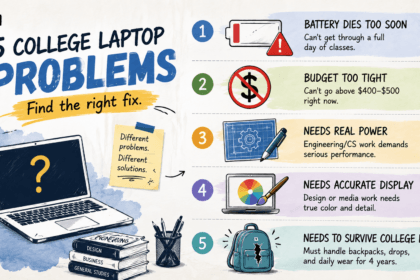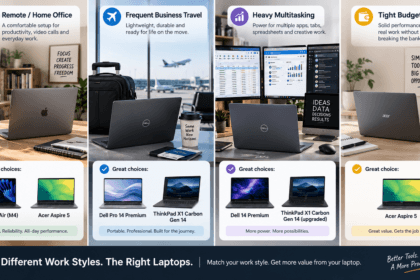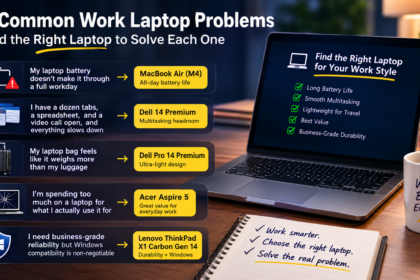



Picking a college laptop is different from picking a general work laptop — it needs to survive four years of daily carrying between classes, handle whatever your major throws at it (from essay writing to CAD software), and, for a lot of students, do all of that without draining a budget that’s already stretched by tuition and textbooks.
- Direct Answer: The Best Laptops for College at a Glance
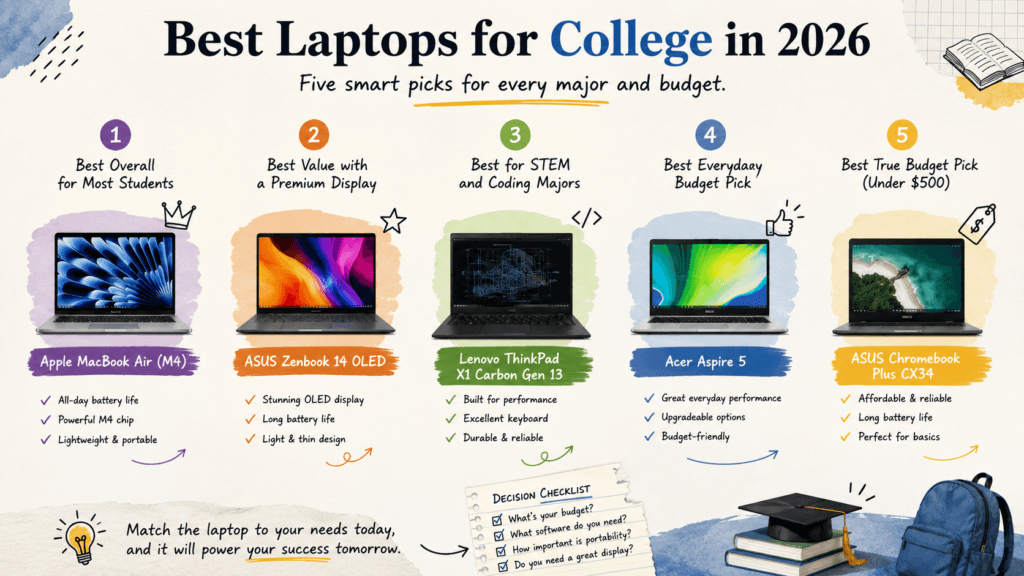
- Apple MacBook Air (M4) — Best Overall for Most Students
- ASUS Zenbook 14 OLED — Best Value With a Premium Display
- Lenovo ThinkPad X1 Carbon Gen 13 — Best for STEM and Coding Majors
- Acer Aspire 5 — Best Everyday Budget Pick
- ASUS Chromebook Plus CX34 — Best True Budget Pick (Under $500)
- Comparison Table
- How to Choose the Right Laptop for Your Major
- FAQ’s
- Conclusion
This guide covers five laptops that consistently show up as strong 2026 picks for college, organized by what they’re actually built for — an all-around top pick, a display-focused value option, a STEM workhorse, a everyday budget choice, and a true bargain pick under $500.
Direct Answer: The Best Laptops for College at a Glance
- Best overall for most students: Apple MacBook Air (M4)
- Best value with a premium display: ASUS Zenbook 14 OLED
- Best for STEM and coding majors: Lenovo ThinkPad X1 Carbon Gen 13
- Best everyday budget pick: Acer Aspire 5
- Best true budget pick (under $500): ASUS Chromebook Plus CX34
Below, we break down what each laptop is actually good at, current pricing, and who should look elsewhere.
Apple MacBook Air (M4) — Best Overall for Most Students
Independent reviewers consistently point to the MacBook Air M4 as the best all-around laptop for college in 2026, and the reasoning holds up: it’s thin, genuinely lightweight, and its battery comfortably lasts a full day of back-to-back classes without needing a charger in your bag.
Key specs:
- Apple M4 chip, fanless design
- 16GB unified memory standard (configurable up to 32GB)
- 13-inch or 15-inch display options
- Weighs between 2.7 and 3.3 lbs depending on screen size
Pricing: With the M5 model now available, the M4 has moved to clearance pricing, generally landing around $999–$1,099, though some configurations and retailers list it closer to $1,099–$1,399 depending on RAM and storage.
Pros:
- Handles essay writing, research, media consumption, and even light video editing and 3D graphics without issue
- All-day battery life genuinely holds up across a full class schedule
Cons:
- RAM is fixed at purchase — buy for your major’s workload in year three or four, not just what covers freshman year
- Not the right pick if your program requires Windows-only software (some engineering, CAD, or finance-specific tools)
ASUS Zenbook 14 OLED — Best Value With a Premium Display
For students who want a genuinely premium screen without paying MacBook prices, the Zenbook 14 OLED checks nearly every box: a stunning display, strong everyday performance, and long battery life in a chassis light enough to carry across campus all day.
Key specs:
- Intel Core Ultra 7 or AMD Ryzen AI processor options (varies by configuration)
- 14-inch OLED display, some 2026 configurations reaching 2880×1800 resolution and 120Hz
- 16GB LPDDR5 RAM, up to 1TB NVMe SSD on higher configurations
- Over 12 hours of tested battery life; weighs under 1.4 kg
Pricing: The 2026 lineup generally starts around $999 for AMD-based configurations and $1,199 for Intel Core Ultra variants, with pricing shifting based on RAM and storage.
Pros:
- The OLED display is genuinely excellent for reading, note-taking, and any visual coursework — reviewers specifically note it outperforms IPS panels at a similar price
- Strong battery life paired with a lightweight chassis makes it comfortable for all-day campus carrying
Cons:
- RAM is soldered on most configurations, so buy the tier you’ll need for all four years upfront
- OLED panels carry a small long-term burn-in risk with static content, though built-in pixel-shift features are designed to mitigate this
Lenovo ThinkPad X1 Carbon Gen 13 — Best for STEM and Coding Majors
STEM students running CAD software, MATLAB, Python environments, or simulation tools need a machine that can genuinely handle sustained, demanding workloads — not just browse and write essays. The ThinkPad X1 Carbon Gen 13 is built specifically for that kind of daily reliability.
Key specs:
- Core Ultra 7 processor with a 32GB RAM configuration option
- MIL-SPEC tested build quality
- Legendary ThinkPad keyboard, well-suited to extended coding and writing sessions
- Business-grade reliability reputation across both academic and professional use
Pricing: The ThinkPad X1 Carbon line generally starts around $1,999 for base configurations, with the 32GB RAM configuration relevant to STEM workloads pushing the price higher depending on processor and display options.
Pros:
- Genuinely durable build quality that holds up to years of daily campus use, backpacks, and travel
- One of the most comfortable keyboards available for the long coding and writing sessions STEM coursework demands
Cons:
- Meaningfully more expensive than the other options on this list — a real premium over what most students strictly need for general coursework
- Heavier commitment financially; best justified specifically by majors that need the processing headroom
Acer Aspire 5 — Best Everyday Budget Pick
Not every major or budget calls for a premium laptop, and the Acer Aspire 5 remains one of the most consistently recommended mid-range picks for students who need solid everyday performance without the premium price tag.
Key specs:
- Intel Core i5 (i7 available on some configurations) processor
- 16GB RAM
- 512GB SSD
- 15.6-inch Full HD IPS display
Pricing: Generally available for under $700, with some configurations dropping closer to $500–$600 depending on sales and retailer.
Pros:
- Snappy day-to-day performance for note-taking, research, browsing, and video calls, with fast boot times
- Comfortable keyboard and solid port selection (USB-C and HDMI included) for the price
Cons:
- Display isn’t color-accurate enough for design-focused coursework, though it’s fine for general studying and streaming
- Build quality, while solid, doesn’t match business-line laptops for long-term durability under heavy daily use
ASUS Chromebook Plus CX34 — Best True Budget Pick (Under $500)
For students whose coursework runs primarily through Google Docs, Sheets, and browser-based tools, a Chromebook is the most cost-effective way to get reliable daily performance without stretching a tight budget.
Key specs:
- Intel Core i3-1215U (12th gen) processor
- 8GB LPDDR5 RAM
- 128GB storage
- 14-inch Full HD touchscreen with a 180-degree hinge
Pricing: Generally priced around $325–$400, and typically includes 12 months of Google’s AI-assistant features bundled in.
Pros:
- Build quality that reviewers describe as feeling more premium than the price suggests, with a backlit keyboard (rare at this price point)
- ChromeOS is simple, secure, and low-maintenance — a real advantage for students who don’t want to manage Windows updates and software conflicts
Cons:
- Not suited for specialized desktop software (CAD, advanced video editing, certain engineering or finance tools) that some majors require
- 8GB RAM and 128GB storage are comfortable for browser-based work but limiting if your coursework shifts toward heavier local applications
Comparison Table
| Laptop | Best For | Starting Price | Weight |
|---|---|---|---|
| MacBook Air (M4) | Overall value and battery life | ~$999–$1,099 | ~2.7 lbs (13″) |
| ASUS Zenbook 14 OLED | Premium display on a budget | ~$999–$1,199 | Under 1.4 kg |
| ThinkPad X1 Carbon Gen 13 | STEM/coding majors | ~$1,999 | Ultralight business chassis |
| Acer Aspire 5 | Everyday budget productivity | Under $700 | Standard 15.6″ weight |
| ASUS Chromebook Plus CX34 | True budget (under $500) | ~$325–$400 | Compact 14″ chassis |
How to Choose the Right Laptop for Your Major
Before comparing spec sheets, get clear on three things specific to your situation:
- Check your program’s software requirements first. Some engineering, architecture, and finance programs require Windows-specific software with no reliable Mac alternative. Confirm this before falling in love with a MacBook.
- Match RAM to your major, not just your budget. English and humanities majors can comfortably run 16GB for four years. Engineering, computer science, and data-heavy majors should lean toward 16GB minimum, ideally 32GB if the laptop’s RAM isn’t upgradeable later.
- Weigh portability against your campus layout. If you’re walking significant distances between classes multiple times a day, weight and battery life (MacBook Air, Zenbook 14 OLED) matter more than they might for a commuter student who’s mostly desk-bound.
FAQ’s
Do I need a MacBook for college, or is Windows fine?
Neither is universally better — it depends on your major’s software requirements. General coursework (essays, research, browsing, media) runs equally well on either. Programs requiring specific engineering, CAD, or finance software may need Windows; check with your department before deciding.
Is a Chromebook actually good enough for college?
Yes, specifically for students whose work is primarily browser-based (Google Docs, research, online classes, streaming). It’s the wrong choice if your major requires specialized desktop software that doesn’t run in a browser.
How much RAM do I actually need for college coursework?
16GB is a comfortable baseline for most majors and will handle four years of typical multitasking. STEM majors running simulation software, CAD, or data-heavy applications should consider 32GB, especially on laptops with non-upgradeable RAM.
Is it worth spending more for OLED or a higher-resolution display?
It depends on your coursework. Design, media, and visually detailed majors benefit meaningfully from OLED’s color accuracy and contrast. For general note-taking and reading, a solid Full HD IPS display is genuinely sufficient.
Conclusion
There’s no single best college laptop — the right choice depends on your major’s software needs, your budget, and how much you’re carrying it across campus daily. The MacBook Air M4 remains the strongest all-around pick for most students. The ASUS Zenbook 14 OLED delivers a premium display experience at a lower price. The ThinkPad X1 Carbon Gen 13 is worth the investment for STEM and coding-heavy majors. The Acer Aspire 5 covers everyday needs without the premium price tag. And the ASUS Chromebook Plus CX34 proves a genuinely solid laptop is available for well under $500 if your coursework is mostly browser-based.
Pricing, specifications, and availability for laptops change frequently and may have been updated since this article was published. Always verify current pricing and specs directly on the manufacturer’s or retailer’s official website before purchasing. This article is for informational purposes and does not constitute professional purchasing advice.