

Most “best work laptop” lists rank machines as if everyone’s job looks the same. A remote worker doing video calls from a home office has almost nothing in common with a consultant living out of a carry-on, and neither has much in common with an analyst running a dozen browser tabs and a spreadsheet model simultaneously. Recommending the same laptop to all three is how people end up either overpaying for portability they don’t need, or under-buying power they’ll hit the ceiling on within a year.
This guide is organized around a more useful question than “what’s the best laptop”:
what does your actual workday look like, and which laptop matches that?
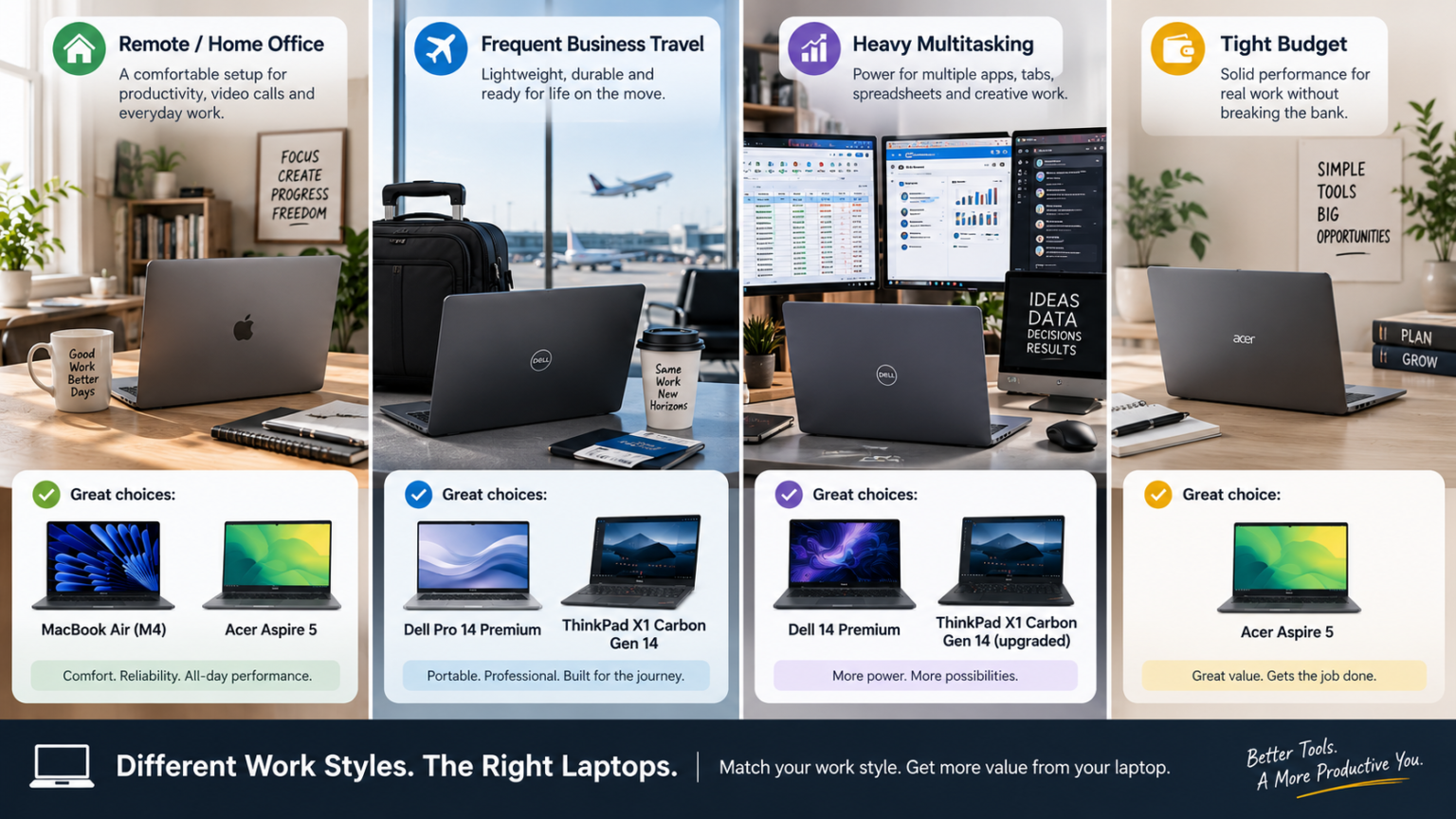
If You Work Remotely From a Home Office
At this stage, portability matters less than screen quality, battery life for a full workday without a mid-afternoon charge scramble, and a comfortable typing experience for hours of writing and messaging.
The Apple MacBook Air (M4) is the strongest fit here. Its fanless, silent design means no fan noise interrupting video calls, and its battery life comfortably covers a full workday. Currently sitting at clearance pricing around $999–$1,099 following the M5 launch, it’s a genuinely strong value if you don’t specifically need Windows software.
If Windows is a requirement, the Acer Aspire 5 covers the same core need — office applications, browser-heavy multitasking, video calls — for under $700, with 16GB of RAM and a comfortable keyboard that holds up well for remote work’s writing-heavy days.
Skip for now: The Dell Pro 14 Premium’s ultra-lightweight design and the ThinkPad’s premium travel-focused build. Neither’s core selling point — portability for daily carrying — applies if your laptop mostly stays on a desk.
If You Travel Frequently for Work
Here, weight and durability move to the top of the priority list, ahead of raw processing power. A laptop you’re carrying through airports and hotel rooms daily needs to disappear into your bag, not weigh it down.
The Dell Pro 14 Premium is purpose-built for this. At roughly 1.15 kg (2.54 lbs) — notably lighter than the 1.42 kg average for laptops in its size class — it’s genuinely comfortable to carry all day. Pricing typically lands in the $1,200–$1,600 range depending on configuration and current promotions.
The Lenovo ThinkPad X1 Carbon Gen 14 is the other strong option here, weighing roughly 996 grams and scoring 9/10 on iFixit for repairability — a meaningful consideration for travelers who need a laptop that can be serviced quickly if something goes wrong on the road. It starts at $1,999 for the base configuration.
Skip for now: The Dell 14 Premium’s discrete graphics and heavier, performance-first build. It’s a strong laptop, but its design explicitly prioritizes power over portability — the opposite of what frequent travel needs.
If Your Work Involves Heavy Multitasking
If your day involves dozens of browser tabs, large spreadsheets, data dashboards, or occasional creative software running simultaneously, raw performance and multitasking headroom matter more than shaving off ounces.
The Dell 14 Premium is built for exactly this. Its optional discrete Nvidia RTX 4050 graphics and strong multitasking performance — including faster 4K-to-1080p video transcoding than several competitors in its class — make it the right fit when your workload genuinely pushes past basic productivity apps. Base pricing starts at $1,649.99 MSRP, though Dell runs frequent sales that can bring configured units with the OLED upgrade closer to $1,899.99.
The Lenovo ThinkPad X1 Carbon Gen 14, configured with its higher-tier processor and up to 64GB of RAM, is also a strong multitasking performer if you need that power in a lighter chassis than the Dell 14 Premium offers — though expect the price to climb well above $2,500 at that configuration.
Skip for now: The Acer Aspire 5 and base MacBook Air configurations. Both handle everyday productivity well, but neither is built with the multitasking headroom that heavy simultaneous workloads demand.
If You’re Working With a Tight Budget
Not every job requires (or justifies) a $1,500+ laptop. If your work is primarily office applications, email, browsing, and video calls, a well-specced budget laptop covers the actual need without paying for capability you won’t use.
The Acer Aspire 5 remains the strongest budget pick, generally available for under $700 with an Intel Core i5 processor, 16GB RAM, and a 512GB SSD — a genuinely solid combination for day-to-day productivity, with snappy boot times and a comfortable keyboard.
Skip for now: Everything else on this list, unless a specific feature (ultra-light build, discrete graphics, macOS) is a hard requirement for your role. The jump from $700 to $1,600+ needs to be justified by an actual need, not just a general sense that “more expensive is better.”
Use-Case Quick Reference
| Your Work Style | Recommended Laptop(s) | Typical Starting Price |
|---|---|---|
| Remote/home office | MacBook Air (M4) or Acer Aspire 5 (Windows) | ~$700–$1,099 |
| Frequent business travel | Dell Pro 14 Premium or ThinkPad X1 Carbon Gen 14 | ~$1,200–$1,999 |
| Heavy multitasking | Dell 14 Premium or ThinkPad X1 Carbon Gen 14 (upgraded) | ~$1,649+ |
| Tight budget | Acer Aspire 5 | Under $700 |
A Note on Mixed Work Styles
Plenty of jobs don’t fit neatly into one category — a consultant who travels but also needs to run data-heavy models, or a remote worker who occasionally has demanding creative tasks. In those cases, prioritize whichever need is least flexible. If you genuinely can’t do your job without carrying the laptop daily, portability wins even if it means slightly less multitasking headroom. If your job is impossible without running heavy applications, power wins even if it means a heavier bag. Trying to optimize for both at once usually means overpaying for a laptop that’s merely adequate at each priority rather than excellent at either.
FAQ’s
I work remotely most weeks but travel occasionally — which category should I prioritize?
Weight the decision by frequency, not possibility. If travel happens a few times a year, a home-office-optimized pick like the MacBook Air is still the better daily-use choice — its battery life and silent operation matter every single day, while portability only matters occasionally.
Is it worth buying a “heavy multitasking” laptop even if I don’t need it yet but expect to in a year or two?
Generally yes, if you plan to keep the laptop for several years and RAM/storage aren’t upgradable — which is true of most laptops on this list. Buying for the workload you’ll have in year three, not year one, avoids a premature upgrade.
Can a budget laptop like the Acer Aspire 5 handle occasional heavier tasks?
It handles typical productivity workloads well, but its display isn’t color-accurate enough for professional design work, and it lacks the multitasking headroom of pricier options. Fine for occasional heavier use; not built for it as a regular workload.
Does operating system matter more than the use-case categories above?
Often yes — it’s frequently the first filter, not the last. If your work requires Windows-specific software, that immediately rules out the MacBook Air regardless of how well it fits your use case otherwise. Confirm software compatibility before working through the use-case categories.
Conclusion
The best laptop for work isn’t a single model — it’s a function of how your specific day actually unfolds. A remote worker, a frequent traveler, a heavy multitasker, and a budget-conscious buyer are solving genuinely different problems, even though they’re all shopping in the same “work laptop” category. Match the laptop to your actual work style rather than the highest-rated option on a generic list, and you’ll get more daily value from a $700 laptop that fits than a $2,000 laptop that doesn’t.
Pricing, specifications, and availability for laptops change frequently and may have been updated since this article was published. Always verify current pricing and specs directly on the manufacturer’s or retailer’s official website before purchasing. This article is for informational purposes and does not constitute professional purchasing advice.