

Every “best work laptop” list leads with the same numbers: processor, RAM, screen size, starting price. What most skip is the part that actually determines whether you’ll be happy with the laptop eighteen months in — the trade-off baked into the design that the spec sheet doesn’t flag, because it’s not technically a flaw, just a decision the manufacturer made that may not match how you’ll actually use the machine.
- MacBook Air (M4): The Trade-Off Is No Upgrade Path, Ever
- Lenovo ThinkPad X1 Carbon Gen 14: The Trade-Off Is the Base Configuration Isn’t the Reviewed Configuration
- Dell 14 Premium: The Trade-Off Is You Almost Never Pay MSRP (In Either Direction)
- Dell Pro 14 Premium: The Trade-Off Is Portability Comes at the Cost of Graphics Flexibility
- Acer Aspire 5: The Trade-Off Is Business-Grade Durability Isn’t Included at This Price
- Spec Sheet vs. Real-World Trade-Off
- FAQ’s
- Conclusion
This guide takes the opposite approach from a typical roundup. For each laptop, we lead with the trade-off, then explain whether it’s still the right buy despite it.
MacBook Air (M4): The Trade-Off Is No Upgrade Path, Ever
The MacBook Air’s fanless design and battery life are genuinely excellent, and at clearance pricing around $999–$1,099 following the M5 launch, it’s a strong value. The trade-off that doesn’t show up clearly on the spec sheet: RAM is fixed at purchase with zero upgrade path, ever. Both the M4 and M5 Air ship with 16GB unified memory at the base tier, maxing out at 32GB — and whatever you choose at checkout is what you’re living with for the life of the machine.
This matters more than it sounds. Reviewers specifically note that if you plan to keep the laptop for four or five years and expect anything resembling heavier workloads down the line, the safer move is paying for more RAM now — the 24GB tier is frequently cited as the sweet spot for that scenario — rather than assuming you can address it later.
Is it still worth it? Yes, if you buy the RAM configuration for the workload you’ll have in year three or four, not the one you have today. It’s the wrong buy if you’re tempted to save $200 now on the base 16GB tier while suspecting you’ll need more later.
Lenovo ThinkPad X1 Carbon Gen 14: The Trade-Off Is the Base Configuration Isn’t the Reviewed Configuration
The ThinkPad X1 Carbon Gen 14 earns strong praise for its 2.8K OLED display, redesigned Space Frame internals, and 9/10 iFixit repairability score. The catch: the $1,999 starting price gets you the base model, which ships with a lower-tier WUXGA IPS display and a lower-tier Core Ultra processor — not the OLED panel and premium specs that most reviews are actually testing and praising.
Upgrading to the 2.8K OLED screen, 64GB RAM, and larger storage pushes the price well above $2,500 — a jump of 25%+ over the advertised starting price, and the configuration most reviewers are actually describing when they praise the display quality.
Is it still worth it? Yes, but budget for the upgraded configuration if display quality and higher RAM matter to your work — treat the $1,999 figure as an entry point to the ThinkPad ecosystem, not the price of the laptop being reviewed in most coverage.
Dell 14 Premium: The Trade-Off Is You Almost Never Pay MSRP (In Either Direction)
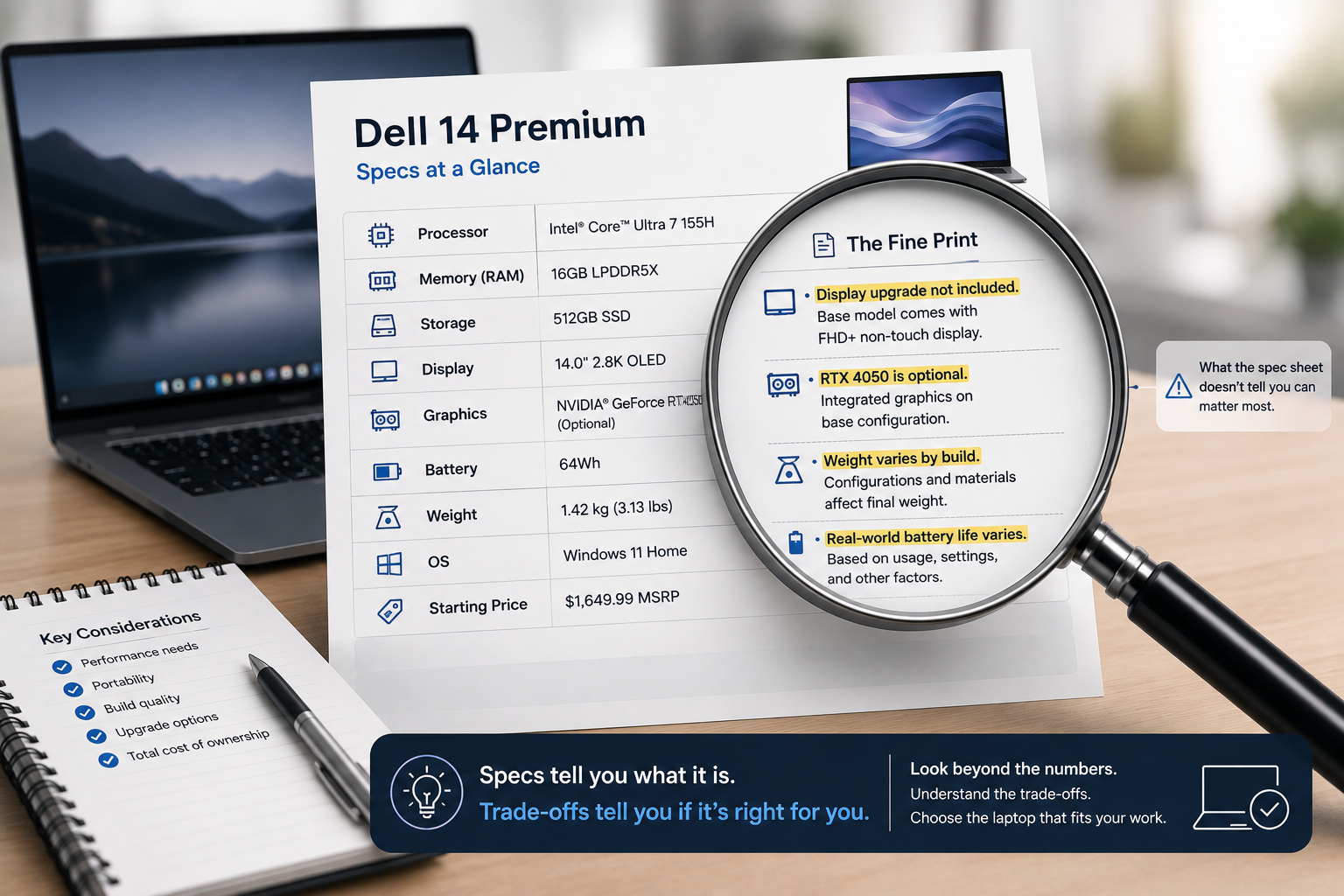
The Dell 14 Premium’s MSRP is listed at $1,649.99 for the base configuration with 16GB RAM, 512GB storage, and a non-touch display. In practice, reviewers note you’re unlikely to pay that number — Dell frequently runs sales, and a tested unit with the OLED display upgrade was seen at $1,899.99 after a $150 discount from its higher list price.
This cuts both ways: the discount culture means the base MSRP is rarely the real price, but it also means budgeting around list price for an upgraded configuration can undersell what you’ll actually pay once you add the display and RAM you want.
Is it still worth it? Yes, but check current pricing directly before budgeting — don’t anchor to either the MSRP or a specific sale price you saw in a review, since both can shift within weeks.
Dell Pro 14 Premium: The Trade-Off Is Portability Comes at the Cost of Graphics Flexibility
The Dell Pro 14 Premium’s headline strength — weighing roughly 1.15 kg, notably lighter than the 1.42 kg average for its size class — is genuinely earned. The trade-off: base configurations ship with integrated graphics only, no discrete GPU option. This is a deliberate design choice that keeps the chassis thin and light, but it means the laptop isn’t built for even occasional graphics-intensive work, unlike the Dell 14 Premium’s optional RTX 4050.
Is it still worth it? Yes, if portability is genuinely your top priority and your work doesn’t touch graphics-intensive tasks. If there’s any chance you’ll need discrete graphics occasionally, this isn’t the laptop to stretch that assumption on.
Acer Aspire 5: The Trade-Off Is Business-Grade Durability Isn’t Included at This Price
The Acer Aspire 5’s combination of a Core i5 processor, 16GB RAM, and 512GB SSD for under $700 is a genuinely strong value, and day-to-day performance holds up well for typical productivity work. The trade-off that a straightforward spec comparison misses: build quality and long-term durability, while solid for the price, don’t match business-line laptops like the ThinkPad or Dell Pro series — a category difference that spec sheets alone don’t capture, since build quality doesn’t show up as a line item.
Is it still worth it? Yes, for most general productivity use — email, browsing, office applications, video calls. If your work involves rougher daily handling (frequent travel, being tossed in bags without a sleeve, years of heavy daily use), the durability gap with business-line laptops becomes a more relevant factor than the spec sheet alone suggests.
Spec Sheet vs. Real-World Trade-Off
| Laptop | What the Spec Sheet Shows | The Trade-Off It Doesn’t Show |
|---|---|---|
| MacBook Air (M4) | 16GB RAM, upgradeable to 32GB at purchase | No upgrade path after purchase — buy for year 3–4, not year 1 |
| ThinkPad X1 Carbon Gen 14 | Starts at $1,999 | Base config lacks the OLED display most reviews are describing |
| Dell 14 Premium | $1,649.99 MSRP | Real price fluctuates with frequent sales — MSRP is rarely what you pay |
| Dell Pro 14 Premium | 1.15 kg, ultra-light design | Integrated graphics only — no discrete GPU option at any base tier |
| Acer Aspire 5 | Strong specs under $700 | Build durability doesn’t match business-line laptops at any price |
FAQ’s
Should I always buy more RAM than I currently need?
For laptops with no upgrade path (MacBook Air and most ultraportables on this list), yes — factor in your workload three to four years out, not today’s needs, since you won’t be able to add RAM later.
Why do “starting at $X” prices sometimes feel misleading?
Because the configuration most reviews actually test and describe — with upgraded display, RAM, or storage — is often meaningfully more expensive than the advertised starting price. Treat starting prices as an entry point to the lineup, not the price of the laptop being reviewed.
Is it worth waiting for a sale instead of buying at list price?
Often yes for laptops from brands with frequent promotional pricing, like Dell — but don’t wait indefinitely, since sale timing and depth vary and current pricing should always be checked directly before deciding.
How do I know if I need discrete graphics or if integrated is enough?
If your work never touches video editing, 3D rendering, or graphics-intensive applications, integrated graphics (as in the Dell Pro 14 Premium) are genuinely sufficient. If there’s any regular need, even occasional, choose a laptop with discrete graphics as an option from the start.
Conclusion
None of these trade-offs make the laptops bad purchases — the MacBook Air, ThinkPad X1 Carbon Gen 14, Dell 14 Premium, Dell Pro 14 Premium, and Acer Aspire 5 are all genuinely strong options in their categories. The difference between a satisfying purchase and a frustrating one usually comes down to whether you understood the trade-off baked into the design before buying, not after you’ve been living with it for a year.
Pricing, specifications, and availability for laptops change frequently and may have been updated since this article was published. Always verify current pricing and specs directly on the manufacturer’s or retailer’s official website before purchasing. This article is for informational purposes and does not constitute professional purchasing advice.