

Ask ten incoming freshmen what makes a “good” college laptop, and a lot of the answers trace back to assumptions nobody’s actually tested — every student needs a MacBook, more RAM is always worth the extra cost, a Chromebook is only for basic browsing. Some of this advice made sense a few years ago. In 2026’s laptop market, several of these assumptions are quietly steering students toward overspending, or toward picking a machine that doesn’t actually fit their coursework.
- Myth 1: “Every college student needs a MacBook”
- Myth 2: “More RAM is always worth paying extra for”
- Myth 3: “A Chromebook is only good for basic browsing, not real coursework”
- Myth 4: “A more expensive laptop will always last longer through college”
- Myth 5: “OLED displays are strictly better, so always choose one if you can afford it”
- Myth vs. Reality: Quick Reference
- FAQ’s
- Conclusion
Here are five of the most common myths about college laptops, what the evidence actually shows, and what to do instead.
Myth 1: “Every college student needs a MacBook”
The assumption: Since the MacBook Air is consistently ranked as the best overall college laptop, it’s the safe, universal choice regardless of major or budget.
The reality: The MacBook Air genuinely earns its top-overall reputation for general coursework — writing, research, browsing, media, and even moderate video editing. But “best overall” isn’t the same as “best for everyone.” Programs requiring Windows-specific engineering, CAD, or finance software need a Windows machine regardless of how good the MacBook Air is at everything else. And students on a tight budget are far better served by a laptop like the ASUS Chromebook Plus CX34, at roughly a third of the MacBook’s price, if their coursework is genuinely browser-based.
What to do instead: Check your program’s specific software requirements and your actual budget constraint first. If nothing rules out macOS and the budget allows it, the MacBook Air is a strong default — but it’s a default worth confirming, not an automatic requirement.
Myth 2: “More RAM is always worth paying extra for”
The assumption: Since RAM is one of the most commonly cited laptop specs, upgrading to the maximum available configuration is a smart, low-risk way to future-proof any college laptop purchase.
The reality: It depends entirely on whether your major will actually use that headroom and whether the RAM is upgradeable later. On laptops with no upgrade path — like the MacBook Air, which ships with RAM fixed at purchase — paying extra for a general studies or humanities major who will never approach 16GB’s ceiling is money that could go toward tuition or textbooks instead. On the other hand, an engineering or CS student on the same non-upgradeable hardware genuinely benefits from paying for 32GB upfront, since there’s no way to add it later.
What to do instead: Match RAM spending to your actual major’s demands, not a general instinct that more is always safer. Check whether the specific laptop’s RAM is soldered before deciding how much to prioritize this spec.
Myth 3: “A Chromebook is only good for basic browsing, not real coursework”
The assumption: Chromebooks are budget toys suitable for checking email and watching videos, but not serious enough for actual college-level work.
The reality: This was truer several years ago than it is in 2026. Modern Chromebooks like the ASUS Chromebook Plus CX34 handle genuine coursework well — research, writing, presentations, spreadsheets, video calls, and increasingly capable AI-assistant features — for students whose programs are built around browser-based tools like Google Docs and Sheets. The real limitation isn’t “seriousness,” it’s a specific software ceiling: ChromeOS genuinely cannot run CAD, MATLAB, or many specialized development environments, regardless of how capable the hardware is.
What to do instead: Judge a Chromebook by your program’s specific software requirements, not by outdated assumptions about the category. If your coursework is genuinely browser-based, it’s a legitimate, capable choice — not a compromise.
Myth 4: “A more expensive laptop will always last longer through college”
The assumption: Since the Lenovo ThinkPad X1 Carbon Gen 13 costs significantly more than the Acer Aspire 5, it must be the safer bet for surviving four years of college wear and tear regardless of your situation.
The reality: The ThinkPad’s price premium is specifically paying for MIL-SPEC tested durability and processing headroom that matters enormously for STEM students carrying it through demanding coursework and rough daily handling. But for a student who’s generally careful with their laptop, uses a protective sleeve, and is studying a less processing-intensive major, that premium buys durability against a level of wear-and-tear risk they may not actually be exposed to. The Acer Aspire 5’s build quality, while not business-grade, is genuinely solid for typical, reasonably careful daily use.
What to do instead: Weigh the durability premium against your actual daily handling habits and major, not a general assumption that price equals longevity for every student in every situation.
Myth 5: “OLED displays are strictly better, so always choose one if you can afford it”
The assumption: Since OLED displays like the one on the ASUS Zenbook 14 OLED offer superior color and contrast compared to standard IPS panels, choosing OLED is simply the smarter upgrade whenever the budget allows.
The reality: OLED’s color accuracy and contrast are genuine advantages, particularly valuable for design, media, and visually detailed coursework. But OLED panels also carry a long-term burn-in risk with extended static content display — a real trade-off, not eliminated by built-in mitigation features, just reduced. For a student whose coursework is mostly text-heavy reading and writing with the same interface displayed for hours, that’s a trade-off being accepted for a benefit (color accuracy) that doesn’t meaningfully improve their actual daily work.
What to do instead: Choose OLED specifically when your coursework benefits functionally from its color accuracy and contrast, not simply because it’s the more premium-feeling option. For primarily text-based work, a solid IPS display is a reasonable, lower-risk choice.
Myth vs. Reality: Quick Reference
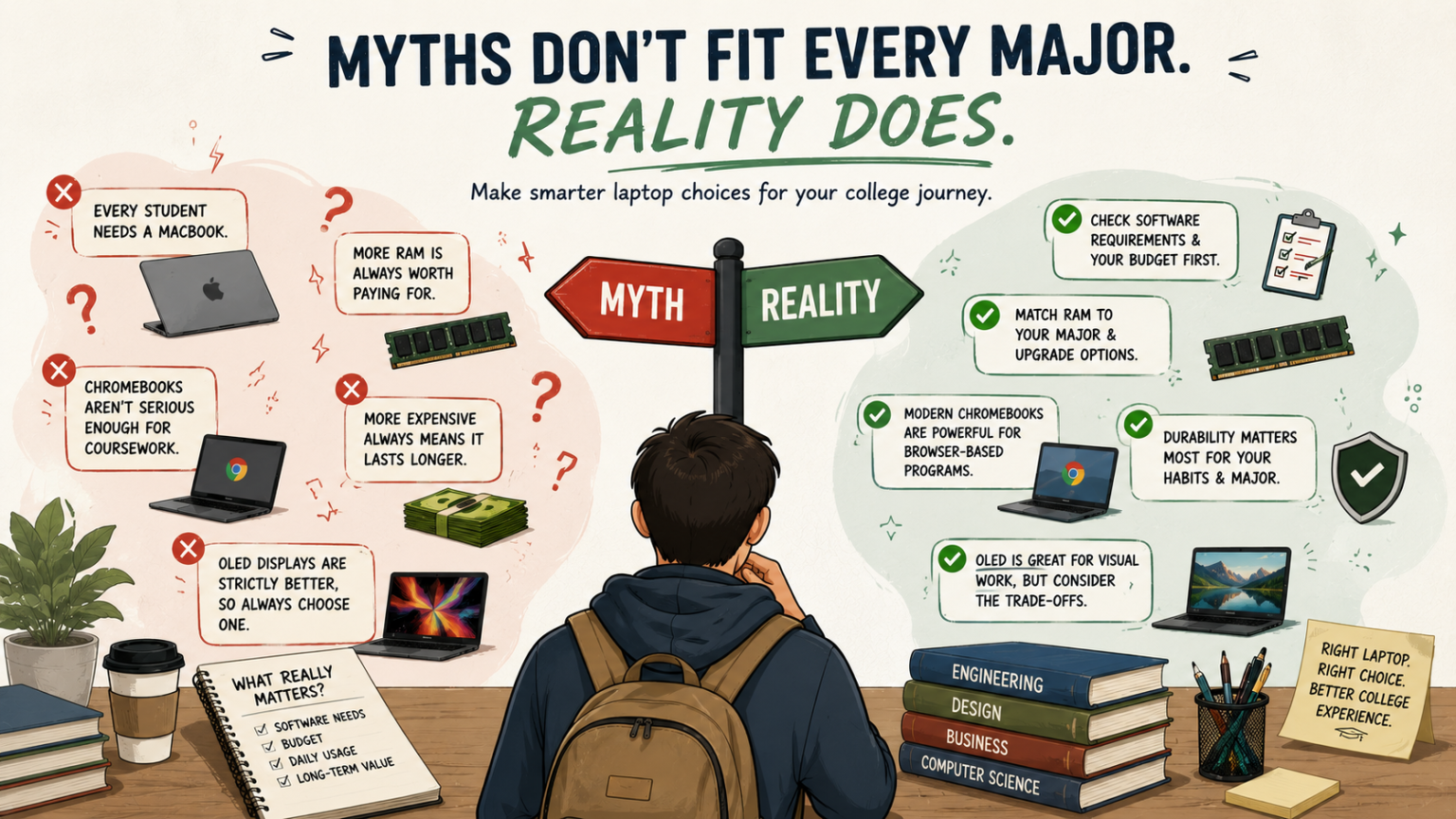
| Myth | Reality |
|---|---|
| Every college student needs a MacBook | Best overall for general coursework, not universal — check software needs and budget first |
| More RAM is always worth paying for | Only matters if your major will use it and the RAM isn’t upgradeable later |
| Chromebooks aren’t serious enough for coursework | Genuinely capable for browser-based programs; the real limit is a specific software ceiling |
| More expensive always means it lasts longer | Durability premiums matter most for rough handling and demanding majors, not universally |
| OLED is strictly better if you can afford it | Genuine advantage for visual coursework; a real trade-off (burn-in risk) for mostly text-based use |
FAQ’s
How do I find out if my major requires Windows-specific software before I buy?
Check your department’s recommended technology page if one exists, or ask an academic advisor directly — many programs publish specific software and hardware requirements before the semester starts.
Is it ever okay to buy a laptop before confirming my major’s exact software requirements?
Yes, especially for general studies or undeclared students — just lean toward a laptop with enough flexibility (like the MacBook Air or ASUS Zenbook 14 OLED) to comfortably cover a range of directions, rather than committing to either a highly specialized or highly limited option.
Should I ask my school if they have a recommended or required laptop list?
Yes — many colleges and specific departments (especially engineering, architecture, and business programs) publish minimum specs or required software, which should take priority over general “best laptop” advice from outside sources.
Is it a mistake to buy the cheapest laptop that technically meets my program’s minimum requirements?
Not necessarily, if it’s a laptop you’re planning to keep for one program’s specific, stable needs — but if there’s a real chance those needs will grow (a shifting major, an added minor), buying slightly above the stated minimum requirements is often the safer long-term choice.
Conclusion
None of these five myths are unreasonable on their face — they’re mostly advice that made sense as a general default and hasn’t been re-examined against how laptops, and college programs, actually work in 2026. The pattern across all five: the right college laptop decision comes down to your specific major, budget, and daily habits, not a general rule about brand, price, RAM, or display technology. Test each assumption against your own actual coursework and constraints before you buy, not after you’re a semester in and stuck with the choice.
Pricing, specifications, and availability for laptops change frequently and may have been updated since this article was published. Always verify current pricing and specs directly on the manufacturer’s or retailer’s official website before purchasing. This article is for informational purposes and does not constitute professional purchasing advice.