

Most students don’t shop for a new laptop because they want the latest model — they buy one because something specific is making coursework harder than it needs to be. The battery dies halfway through a lecture block. The budget genuinely can’t stretch past $400. A design class demands color accuracy the current screen can’t deliver. Most “best college laptop” guides skip straight to spec comparisons without asking the more useful question first:
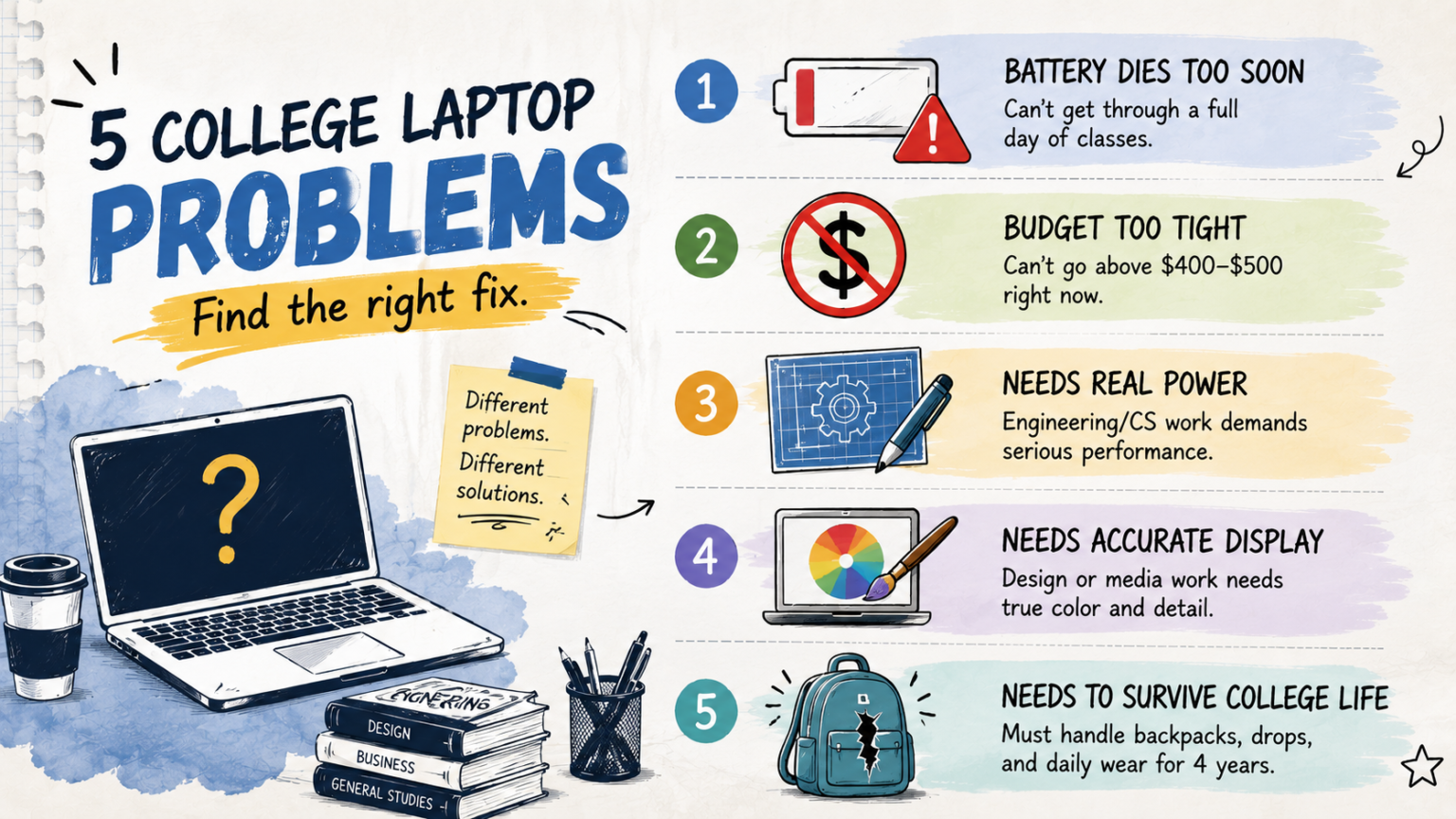
- Problem 1: “My laptop battery doesn’t survive a full day of back-to-back classes”
- Problem 2: “My budget genuinely can’t go above $400–$500”
- Problem 3: “My engineering/CS coursework needs real processing power, and it’s only going to get more demanding”
- Problem 4: “My design/media coursework needs a screen I can actually trust for color and detail”
- Problem 5: “I need something that survives four years of backpacks, dorm chaos, and daily wear”
- Matching Problems to Laptops: Quick Reference
- A Word on Solving More Than One Problem at Once
- FAQ’s
- Conclusion
what’s actually the problem you’re trying to solve?
Here are five common college laptop problems in 2026, and the specific laptops built to solve each one.
Problem 1: “My laptop battery doesn’t survive a full day of back-to-back classes”
If you’re hunting for outlets in lecture halls or carrying a charger everywhere out of habit, the fix is a laptop specifically engineered for all-day efficiency, not just a bigger battery bolted onto power-hungry components.
The right laptop: MacBook Air (M4). Its fanless design and efficient chip architecture combine for battery life that comfortably covers a full day of classes without a mid-afternoon charge. At clearance pricing around $999–$1,099, it’s currently one of the stronger values specifically for this problem.
Where it falls short: If your program requires Windows-specific software, battery life alone doesn’t solve a compatibility problem — confirm your major’s software needs before switching platforms just to fix battery anxiety.
Problem 2: “My budget genuinely can’t go above $400–$500”
If tuition, housing, and textbooks have already stretched your budget thin, the fix isn’t stretching further into debt for a premium laptop — it’s finding genuinely capable hardware within your actual constraint.
The right laptop: ASUS Chromebook Plus CX34. Priced around $325–$400, it delivers build quality reviewers describe as feeling more premium than the price suggests, along with a backlit keyboard — a genuinely rare feature at this price point — and bundled AI-assistant features.
Where it falls short: ChromeOS can’t run CAD software, MATLAB, or many specialized development environments — this is a hard software limit, not something that improves with patience. Confirm your coursework is genuinely browser-based across your expected years in the program before committing.
Problem 3: “My engineering/CS coursework needs real processing power, and it’s only going to get more demanding”
This is a different problem than general slowness — it’s a headroom problem specific to sustained, resource-intensive workloads like compiling code, running simulations, or working in CAD environments.
The right laptop: Lenovo ThinkPad X1 Carbon Gen 13. Its Core Ultra 7 processor with a 32GB RAM configuration gives it real multitasking and processing headroom for demanding STEM coursework, backed by MIL-SPEC tested durability built to survive years of daily use. Pricing generally starts around $1,999, climbing with the higher-RAM configuration STEM workloads benefit from.
Where it falls short: That headroom comes at a real financial premium — meaningfully more than every other laptop on this list. It’s the wrong fix if your coursework doesn’t genuinely require this level of sustained processing power.
Problem 4: “My design/media coursework needs a screen I can actually trust for color and detail”
If you’re second-guessing your own creative work because you’re not sure whether it’s the piece or the screen, the fix is a laptop with a display genuinely built for color-accurate, high-contrast visual work.
The right laptop: ASUS Zenbook 14 OLED. Its OLED panel — reaching 2880×1800 resolution with wide color gamut coverage on 2026 configurations — delivers meaningfully better contrast and color accuracy than a standard IPS display, making it a genuine asset for evaluating photo, video, and design work. Starting around $999–$1,199, it undercuts pricier alternatives with comparable display quality.
Where it falls short: OLED panels carry a long-term burn-in risk with extended static content display — a real, if partially mitigated, trade-off. It’s also not the pick if your coursework is CAD or simulation-heavy rather than visual-quality-focused; the ThinkPad’s processing headroom matters more there.
Problem 5: “I need something that survives four years of backpacks, dorm chaos, and daily wear”
If your current laptop shows every scuff and you’re worried about repeating that cycle, the fix is a laptop specifically built and tested for physical durability, not just impressive specs on paper.
The right laptop: Lenovo ThinkPad X1 Carbon Gen 13 again earns its place here, specifically for its MIL-SPEC tested build quality — a genuine, tested standard for surviving drops, temperature swings, and rough daily handling, not just marketing language. If the price is out of reach, the Acer Aspire 5 (under $700) offers a reasonable middle ground: solid, if not business-grade, durability at a fraction of the ThinkPad’s cost.
Where it falls short: The ThinkPad’s durability premium is a real financial commitment. The Acer Aspire 5’s build quality, while solid for the price, genuinely doesn’t match business-line laptops for years of heavy daily wear — an honest trade-off rather than a flaw.
Matching Problems to Laptops: Quick Reference
| Your Problem | Best-Fit Laptop | Not the Right Fit |
|---|---|---|
| Battery doesn’t survive a full class day | MacBook Air (M4) | Windows-required programs |
| Budget genuinely under $400–500 | ASUS Chromebook Plus CX34 | Specialized software requirements |
| STEM coursework needs real processing power | ThinkPad X1 Carbon Gen 13 | Tight-budget general studies |
| Design/media coursework needs display accuracy | ASUS Zenbook 14 OLED | CAD/simulation-heavy STEM work |
| Needs to survive four years of daily wear | ThinkPad X1 Carbon Gen 13 or Acer Aspire 5 | — |
A Word on Solving More Than One Problem at Once
It’s tempting to look for one laptop that solves all five problems simultaneously. In reality, the laptops above are strong specifically because they were engineered around a particular priority — battery efficiency, budget accessibility, processing power, display quality, or physical durability — rather than trying to be excellent at everything at once. Identify which problem is actually costing you the most (a missed deadline from a dead battery, or genuine financial strain from an unaffordable laptop) and solve that one specifically, rather than chasing a laptop that claims to do it all.
FAQ’s
What if I have more than one of these problems at the same time?
Prioritize the one that’s non-negotiable. A hard budget ceiling usually can’t flex, so start there; then look for the best available option within that constraint that also addresses your second-highest priority.
Can a budget laptop like the ASUS Chromebook Plus CX34 be upgraded to handle heavier software later?
No — ChromeOS’s software limitations aren’t a hardware problem you can upgrade your way out of. If there’s a real chance your coursework will need CAD or similar specialized software, a Windows or Mac option is the safer starting point, even at a higher upfront cost.
Is the ThinkPad’s durability actually necessary, or is that marketing?
MIL-SPEC testing is a genuine, verifiable durability standard, not just marketing language — but whether you need it depends on how roughly you actually treat your laptop day to day. A student who’s careful with a protective sleeve may not need this specific premium.
How do I know if display quality genuinely matters for my coursework, or if I’m just drawn to a nicer screen?
If your coursework involves evaluating your own visual work — photo editing, video color grading, design — accuracy genuinely matters functionally. If you’re mostly reading text and browsing, a nicer screen is a comfort upgrade, not a functional necessity.
Conclusion
The fastest way to end up frustrated with a college laptop is buying based on general reputation instead of the specific problem you’re actually trying to solve. Match the laptop to what’s genuinely broken or missing — battery life, budget fit, processing power, display accuracy, or physical durability — and you’ll get more value across four years of coursework than picking whichever model tops a generic “best laptops” list.
Pricing, specifications, and availability for laptops change frequently and may have been updated since this article was published. Always verify current pricing and specs directly on the manufacturer’s or retailer’s official website before purchasing. This article is for informational purposes and does not constitute professional purchasing advice.