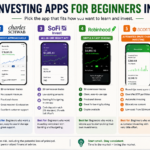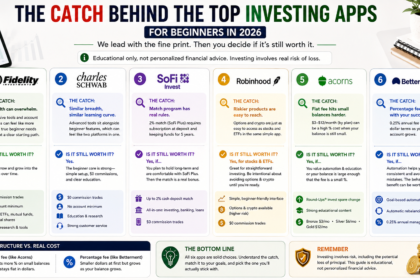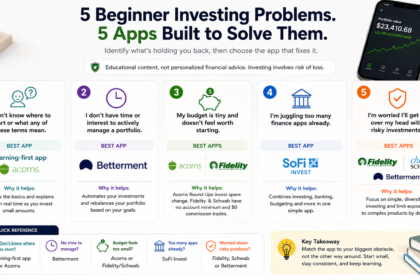


Getting started with investing in 2026 no longer requires a finance degree or a minimum deposit of thousands of dollars — most apps now let you start with as little as a few dollars, offer zero-commission trades, and build in educational content specifically for people who’ve never bought a stock before. The challenge isn’t access anymore; it’s figuring out which app actually fits how you want to learn and invest.
- Direct Answer: The Best Investing Apps for Beginners at a Glance
- Fidelity — Best Overall for Most Beginners
- Charles Schwab — Best Well-Known, Approachable Brokerage
- SoFi Invest — Best All-in-One Money App
- Robinhood — Best Simple Self-Directed Trading Interface
- Acorns — Best for Automated Spare-Change Investing
- Betterment — Best for Hands-Off, Goal-Based Investing
- Comparison Table
- How to Choose the Right Investing App for You
- FAQ’s
- Conclusion
This guide compares six investing apps that consistently show up as strong 2026 picks for beginners, covering fees, features, and who each one is actually built for.
Before you continue: this article provides factual comparisons to help you research your options — it isn’t personalized financial advice, and none of the authors are licensed financial advisors. Investing involves risk, including the potential loss of principal, and you should consider consulting a qualified financial professional for guidance specific to your situation.
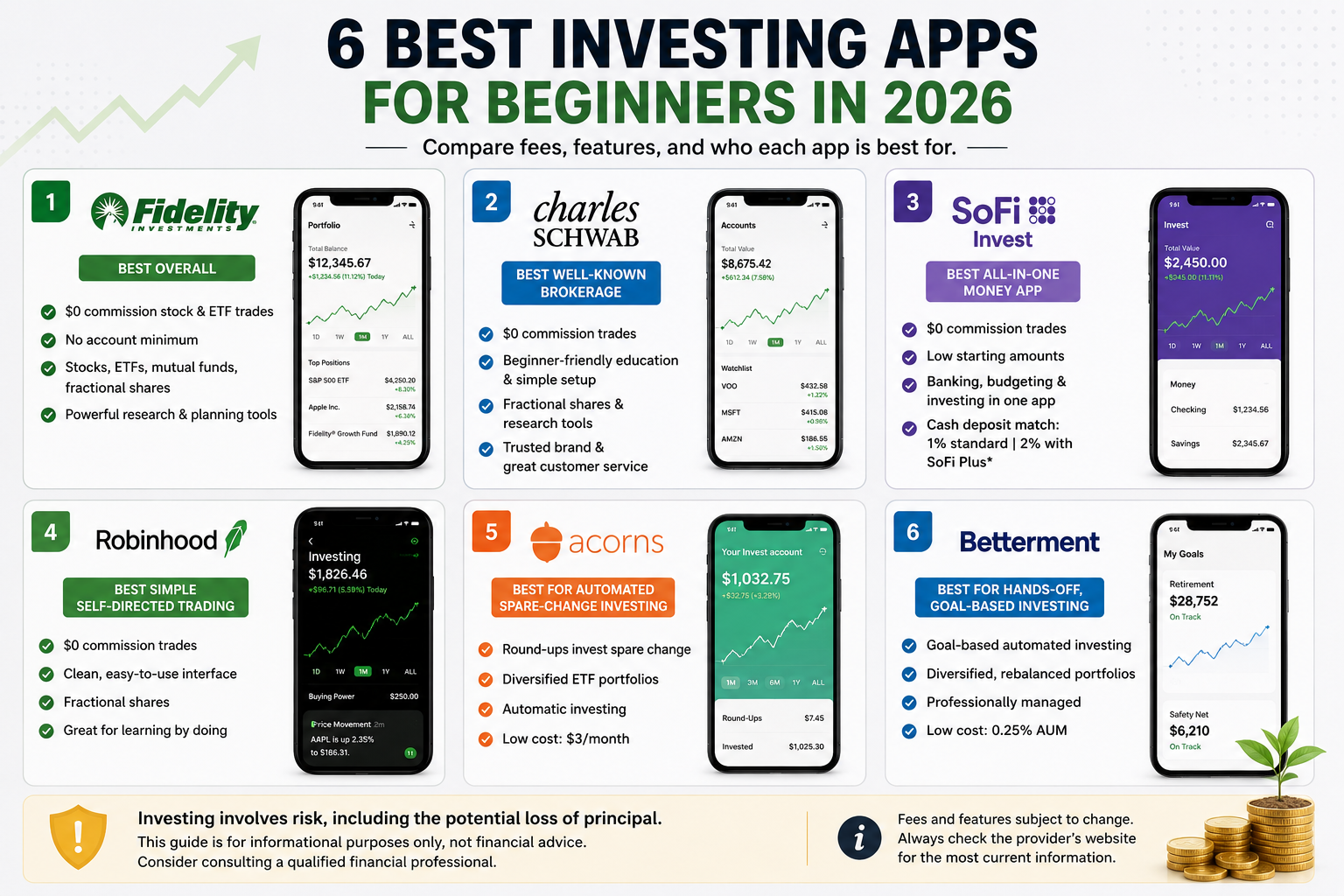
Direct Answer: The Best Investing Apps for Beginners at a Glance
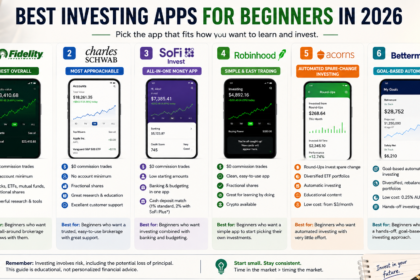
- Best overall for most beginners: Fidelity
- Best for a well-known, approachable brokerage: Charles Schwab
- Best all-in-one money app: SoFi Invest
- Best simple self-directed trading interface: Robinhood
- Best for automated spare-change investing: Acorns
- Best for hands-off, goal-based investing: Betterment
Below, we break down what each app actually offers, real costs, and where each one falls short.
Fidelity — Best Overall for Most Beginners
Fidelity is repeatedly cited as the default recommendation for beginners in 2026, largely because it combines a genuinely broad investment menu with zero-commission trades and strong educational content — the “app with no money” (no account minimum) that reviewers say people are actually likely to stick with.
Key features:
- $0 commission stock and ETF trades
- No account minimum to open a brokerage account
- Broad investment menu including stocks, ETFs, mutual funds, and fractional shares
- Extensive research and planning tools that scale with you as you learn
Costs: No account minimum and no commission on standard stock/ETF trades; specific fund expense ratios and any account-specific fees should be checked directly on Fidelity’s site.
Pros:
- Genuinely broad enough to grow with you from a first stock purchase to more advanced research tools later
- SIPC-protected, regulated by FINRA, and widely regarded as reliable and low-friction to start
Cons:
- Its sheer breadth of tools and account types can feel like more than a total beginner needs at first glance
- Doesn’t have the built-in “gamified” learning experience (challenges, daily lessons) that some newer, education-first apps offer
Charles Schwab — Best Well-Known, Approachable Brokerage
Charles Schwab pairs a well-known, trusted brand name with a platform genuinely designed to be approachable for first-time investors, while still offering enough depth for people who want to grow into more advanced investing later.
Key features:
- $0 commission trades
- Clear, beginner-oriented educational tools and simple account setup
- Access to fractional shares and more advanced research tools as you progress
- Strong customer service reputation
Costs: No commission on standard trades; no account minimum for a standard brokerage account, though specific managed portfolio products may carry their own minimums and fees.
Pros:
- Combines brand trust and reliability with a genuinely low-friction beginner experience
- Reviewers specifically highlight its balance of simplicity for new investors and depth for more experienced ones
Cons:
- Similar to Fidelity, its broader platform and account options can feel like more infrastructure than a true first-time investor immediately needs
- Less focused on gamified or bite-sized learning content compared to newer, education-first competitors
SoFi Invest — Best All-in-One Money App
If you’d rather manage investing alongside banking, budgeting, and other money tools in a single app rather than juggling separate platforms, SoFi Invest is specifically built around that all-in-one approach.
Key features:
- Combines investing with broader personal finance tools (banking, budgeting) in one app
- Low starting amounts for opening an account
- $0 commission trades on the investing side
- Cash deposit match programs for eligible members (1% standard, 2% for SoFi Plus subscribers who meet holding requirements)
Costs: $0 commission on standard trades; SoFi Plus is a paid subscription tier that unlocks the higher 2% match rate, with its own terms around retaining deposited funds for a set period.
Pros:
- Genuinely convenient for anyone who wants investing consolidated with everyday banking and budgeting rather than spread across multiple apps
- Deposit match programs can add real, if modest, extra value for consistent contributors
Cons:
- The match program’s terms (subscription requirement, multi-year holding period for the full match) add complexity that a simpler standalone brokerage doesn’t have
- Investment selection and advanced research tools are generally less extensive than a dedicated full-service brokerage like Fidelity or Schwab
Robinhood — Best Simple Self-Directed Trading Interface
Robinhood remains a go-to pick for beginners who want to make their own investment decisions through a straightforward, uncluttered mobile interface, covering stocks, ETFs, options, and cryptocurrency in one app.
Key features:
- Straightforward, minimalist mobile trading interface
- $0 commission trades
- Access to stocks, ETFs, options, and crypto in a single app
- Fractional share investing starting with small dollar amounts
Costs: $0 commission on standard stock and ETF trades; Robinhood Gold is an optional paid subscription tier offering additional features and a higher IRA contribution match (3% versus 1% for non-Gold members).
Pros:
- Genuinely one of the simplest, least intimidating trading interfaces for someone making their first trade
- Broad asset access (including crypto and options) in one place, for beginners who want room to explore later
Cons:
- Its simplicity means less built-in educational guidance compared to apps specifically designed around teaching beginners
- Easy access to options and crypto alongside basic stock investing can be a risk for beginners tempted toward complexity before they’re ready for it
Acorns — Best for Automated Spare-Change Investing
Acorns is built around a specific, low-effort mechanic: rounding up your everyday purchases to the nearest dollar and automatically investing the spare change into a diversified portfolio — a genuinely easy way to start investing without feeling like it’s affecting your budget.
Key features:
- Automatic “Round-Ups” investing spare change from everyday purchases
- Robust educational content, including real-time, simple explanations of unfamiliar financial terms
- Diversified portfolio options without needing to pick individual investments
- Upgraded subscription tiers unlock the ability to hand-pick individual stocks
Costs: Charges a flat monthly fee rather than a percentage-based one — $3/month for the Bronze tier, with Silver and Gold tiers at $6/month and $12/month respectively for additional features.
Pros:
- The round-up mechanic is genuinely one of the easiest ways for a true beginner to start investing consistently without actively thinking about it
- Educational content is specifically designed to explain unfamiliar terms in real time as you use the app
Cons:
- A flat $3–$12/month fee can represent a meaningfully higher percentage cost for investors with very small account balances compared to a percentage-based or zero-fee alternative
- Round-ups alone typically add up to smaller contributions than actively investing a set amount would, meaning it works best as a supplement rather than your only investing strategy
Betterment — Best for Hands-Off, Goal-Based Investing
For beginners who want their money invested according to a specific goal — retirement, a house down payment, general wealth-building — without picking individual stocks themselves, Betterment’s robo-advisor model builds and manages a diversified portfolio automatically based on your goals and risk tolerance.
Key features:
- Automated, goal-based portfolio construction and management
- Diversified investing without requiring you to select individual stocks or funds
- Automatic rebalancing to maintain your target portfolio allocation over time
Costs: Typically charges a percentage-based annual management fee on assets under management rather than per-trade commissions; check current fee tiers directly on Betterment’s site, as these can change.
Pros:
- Genuinely hands-off — a strong fit for beginners who want their money working toward a specific goal without needing to actively manage individual holdings
- Automatic rebalancing removes a task that many self-directed beginners forget or avoid
Cons:
- The percentage-based management fee, while often reasonable, means costs scale up as your account balance grows, unlike a flat-fee or zero-commission self-directed brokerage
- Less suited to beginners who specifically want to learn how to pick individual stocks or actively manage their own portfolio
Comparison Table
| App | Best For | Cost Structure | Account Minimum |
|---|---|---|---|
| Fidelity | Overall beginner-to-advanced growth | $0 commission trades | None |
| Charles Schwab | Trusted, approachable brokerage | $0 commission trades | None |
| SoFi Invest | All-in-one money management | $0 commission trades + optional subscription | Low starting amounts |
| Robinhood | Simple self-directed trading | $0 commission trades + optional Gold tier | None |
| Acorns | Automated spare-change investing | $3–$12/month flat fee | None (round-up based) |
| Betterment | Hands-off, goal-based investing | Percentage-based management fee | Varies |
How to Choose the Right Investing App for You
Before comparing fee structures line by line, get clear on a few practical priorities:
- Decide how hands-on you want to be. If you want to actively pick stocks and learn as you go, Fidelity, Schwab, or Robinhood fit that self-directed approach. If you’d rather have your money managed automatically toward a goal, Betterment or Acorns fit better.
- Check the actual cost structure against your expected balance. A flat monthly fee (like Acorns’ $3/month) can represent a high percentage cost on a very small balance, while a percentage-based fee (like Betterment’s) scales with your account size — do the math for your specific situation rather than assuming one structure is universally cheaper.
- Consider how much built-in education you want. Apps like Acorns specifically emphasize real-time educational explanations, while others assume more self-directed learning.
- Think about whether consolidation matters to you. If you’d rather manage banking and investing in one app, SoFi’s all-in-one approach may reduce friction compared to juggling separate platforms.
FAQ’s
Is it safe to invest through an app instead of a traditional brokerage?
Most major investing apps, including all six covered here, are regulated by FINRA and their brokerage accounts are typically protected by SIPC insurance (up to $500,000 in securities, including $250,000 in cash) if the brokerage itself fails — though this protects against brokerage failure, not against investment losses from market declines, which remain a normal risk of investing.
How much money do I need to start investing?
Very little, in most cases — several of the apps covered here have no account minimum and support fractional share investing, meaning you can start with just a few dollars rather than needing hundreds or thousands upfront.
What’s the difference between a self-directed app and a robo-advisor?
A self-directed app (like Fidelity, Schwab, or Robinhood) lets you choose your own individual investments, while a robo-advisor (like Betterment) automatically builds and manages a diversified portfolio for you based on your goals and risk tolerance, without requiring you to pick individual stocks.
Should I choose an app based on its fees alone?
Fees matter, but they’re not the only consideration — educational content, ease of use, and whether the app’s approach (hands-on versus hands-off) matches how you actually want to invest are equally important for whether you’ll stick with it long-term.
Conclusion
There’s no single best investing app for every beginner — the right choice depends on how hands-on you want to be, how much built-in education you’re looking for, and whether you’d rather manage your investments actively or hand that decision off to automation. Fidelity and Charles Schwab offer the broadest, most trusted starting points for most people; SoFi Invest suits those who want investing consolidated with everyday banking; Robinhood offers the simplest self-directed interface; Acorns makes investing nearly automatic through spare change; and Betterment is built for hands-off, goal-based investors. Whichever you choose, remember that investing carries real risk, and it’s worth doing your own research — or speaking with a licensed financial advisor — before committing money you can’t afford to lose.
This article is for informational and educational purposes only and does not constitute financial, investment, or tax advice. The authors are not licensed financial advisors. Investing involves risk, including the potential loss of principal, and past performance does not guarantee future results. Fees, features, and account terms change frequently and may have been updated since this article was published — always verify current details directly on each provider’s official website, and consider consulting a qualified financial professional before making investment decisions.